299Bet Log In — Secure Account Entry

Logging into 299bet takes under 30 seconds - but knowing where the button is, what to do if your password stops working, and how to stay secure makes the difference between a smooth session and a frustrating one. This page covers every step: the login form, password recovery, mobile access, account security, and what you can do right after signing in.

How to Log In to 299bet

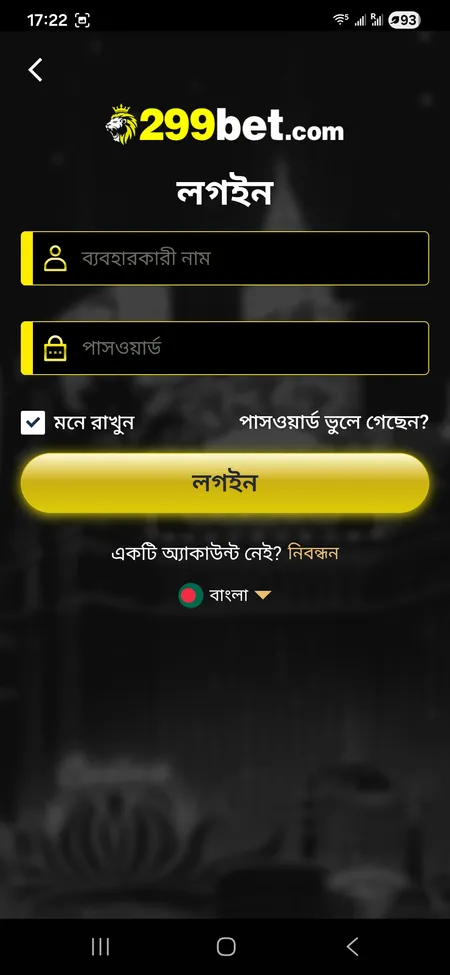
The login form on 299bet is straightforward. Open 299bet.com in your browser, tap লগইন (Login) in the top-right corner, and you will see two fields: ব্যবহারকারী নাম (Username) and পাসওয়ার্ড (Password). Fill them in, toggle মনে রাখুন (Remember me) if you are on a personal device, then press the লগইন button. The platform processes the request and redirects you to your personal dashboard.

If you registered with a phone number - which is the standard flow on 299bet Bangladesh - use that number as your username unless you chose a custom one during signup.

Below the form there is a link: একটি অ্যাকাউন্ট নেই? নিবন্ধন (Don't have an account? Register). New players should visit the 299bet registration page instead.

299bet login form with username and password fields

The login screen shows username, password, Remember me toggle, Forgot password link, and the Login button.

Open 299bet Now

Step-by-Step Login Process

Follow these steps to sign in without issues:

  1. Go to 299bet.com or open the 299bet app on your phone.
  2. Tap the লগইন / Login button in the header.
  3. Enter your username (or phone number used at registration).
  4. Enter your password - it is case-sensitive.
  5. Optionally check Remember me to stay signed in on this device.
  6. Press Login.
  7. If the credentials are correct, you land on the main dashboard with your balance visible at the top.

The entire process takes about 15-20 seconds on a stable mobile connection.

Login on Mobile: Browser and App

299bet is fully optimised for mobile. The mobile web path is /m/login - the same credentials work there as on desktop. The interface scales cleanly to any screen size and the login button stays in the header.

For the dedicated app, download it from the 299bet app page and install the APK on Android, or use the Add to Home Screen option on iOS for a PWA-style shortcut. After installation, open the app and tap Login - the form is identical to the web version. The app supports session persistence, so you typically stay logged in between visits unless you manually log out or clear app data.

One account works across all devices simultaneously. Your balance, betting history, and VIP progress sync in real time.

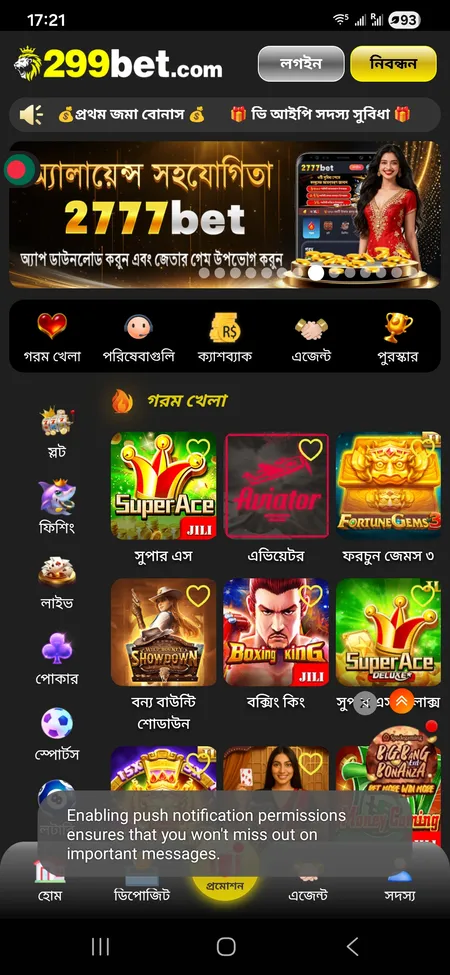
299bet main screen after successful login

After login the home screen shows your balance, VIP level, deposit and withdrawal buttons, and the full game catalogue.

Download the 299bet App

What You Can Access After Logging In

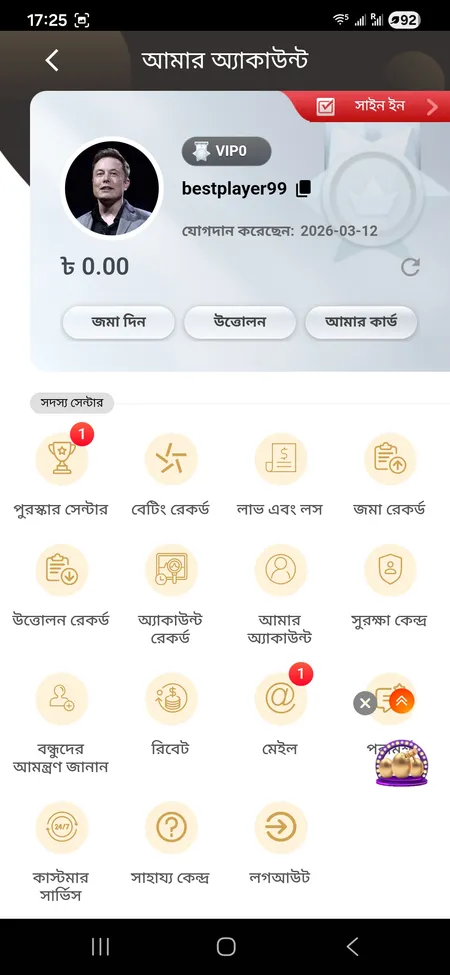
Once inside your account, the আমার অ্যাকাউন্ট (My Account) section gives you full control. Here is a quick map of what is available:

Section What It Does
জমা দিন (Deposit) Top up your BDT balance via bKash, Nagad, Rocket or card
উত্তোলন (Withdraw) Request a withdrawal to your linked e-wallet
পুরস্কার সেন্টার (Reward Center) Claim daily sign-in bonus, recovery fund, referral rewards
বেটিং রেকর্ড (Betting Record) Full history of bets across slots, sports, live casino
সুরক্ষা কেন্দ্র (Security Center) Change password, review linked devices and personal data
রিবেট (Rebate) Manually claim rebate or view rebate history
কাস্টমার সার্ভিস Launch 24/7 live chat in English or Bengali

The VIP level and cumulative bet counter update automatically - no manual action needed.

299bet My Account menu with profile and member centre options

The Member Centre grid shows all key sections: deposits, withdrawals, records, security, rewards and support.

Go to 299bet

Forgot Password: How to Recover Access

If you cannot remember your password, use the পাসওয়ার্ড ভুলে গেছেন? (Forgot password?) link directly below the password field. The recovery process is handled via 24/7 online support because the platform ties accounts to phone numbers rather than a self-service email reset.

Steps to recover access:

  • Tap Forgot password on the login screen.
  • Contact 299bet support via live chat or Telegram (@bd299bet).
  • Provide your registered phone number and account username.
  • Support will verify your identity and assist with resetting the password.

This process typically resolves within a few minutes during active support hours. Avoid sharing your password with anyone presenting themselves as 299bet staff outside official channels.

299bet support operates 24/7 in both English and Bengali. For password recovery, the fastest route is the live chat at [email protected] or the official Telegram channel @bd299bet.

Common Login Problems and How to Fix Them

Most login failures fall into one of these categories:

Problem Likely Cause Solution
Wrong password error Typo or caps lock on Re-enter carefully; check caps lock
Account not found Wrong username format Try phone number instead of username
Page not loading DNS block or network issue Try a mirror domain such as 299bet.bet
Stuck on loading screen Outdated app version Update the app or clear browser cache
Repeated failed attempts Possible temporary lock Contact support via live chat

If 299bet.com is unreachable in your region, the platform maintains mirror domains including 299bet.bet, 299bet88.com, and 299bet888.com - your credentials work on all of them.

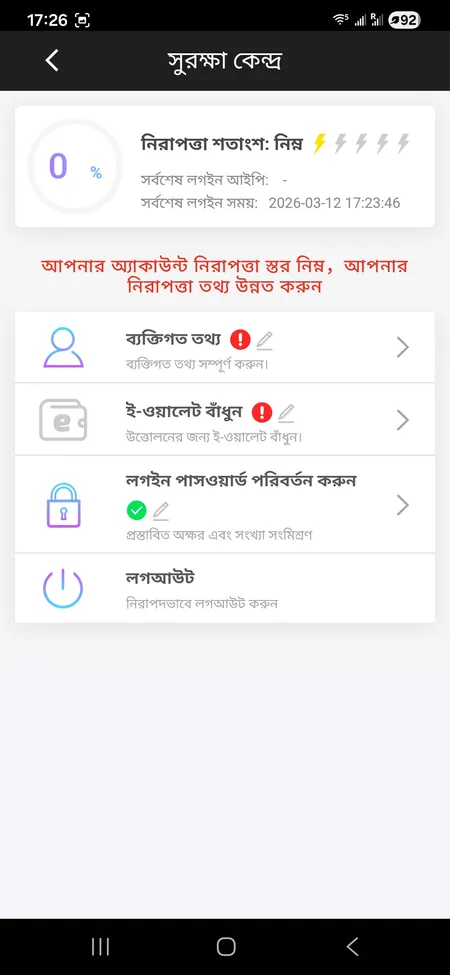
299bet Security Centre showing protection level and password settings

The Security Centre lets you review your protection level, update your password, and manage linked e-wallet details.

Login to 299bet Account

Security: Keeping Your Login Safe

299bet states that player data is encrypted and stored securely. The Security Centre inside your account shows your current protection level and lets you update your password or review linked payment details.

Practical steps to protect your login:

  • Use a password that is unique to 299bet - not reused from email or social media.
  • Enable the Remember me option only on personal devices, never on shared ones.
  • Log out using the লগআউট button in the Member Centre when done on a shared device.
  • Never share login details or respond to messages outside official 299bet channels asking for your credentials.
  • If you receive an unexpected message claiming to be 299bet support and asking for a transfer, report it immediately - 299bet does not request payments via Telegram DMs.

The platform uses session management to detect unusual activity. If a login attempt comes from an unrecognised device, you may be prompted for additional verification.

Beware of fraudsters impersonating 299bet on Telegram or Facebook. The official platform only processes deposits through the website or app interface - never through personal messages asking for direct transfers.

Login and KYC: What to Expect

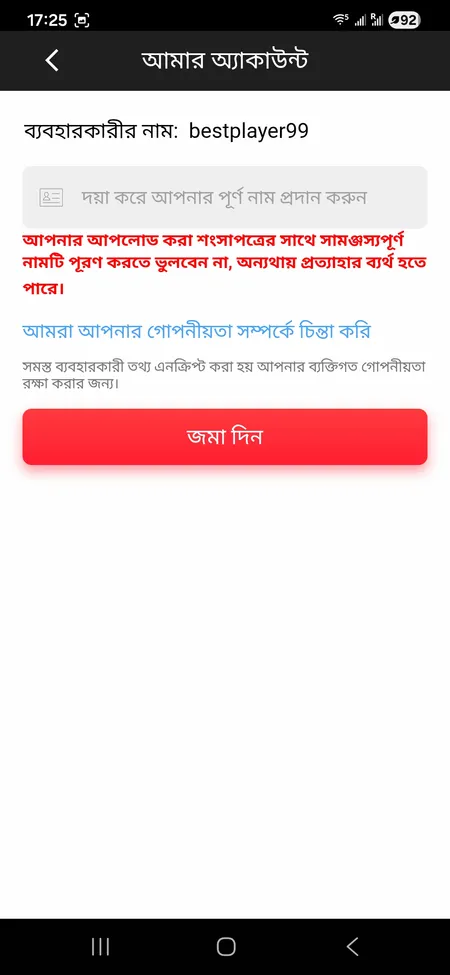
After logging in for the first time, 299bet will ask you to complete your profile. The আমার অ্যাকাউন্ট section includes a পূর্ণ নাম (Full name) field with a red warning: the name you enter must match your identity documents, otherwise withdrawals may be rejected.

KYC (identity verification) becomes active when you request a withdrawal. The verification window is approximately 24 hours. During this period, withdrawal processing is on hold. Completing KYC accurately at setup avoids delays later.

For deposits there is no KYC gate - you can fund your account immediately after logging in with a minimum of BDT 100 via bKash, Nagad, Rocket, bank transfer, or Visa/Mastercard.

299bet account edit screen with full name and withdrawal warning

The account edit screen reminds players that the full name must match documents - otherwise withdrawal requests will be declined.

Register and Start Playing

Logging Out

To end your session, go to আমার অ্যাকাউন্ট (My Account) and scroll to the bottom of the Member Centre grid. Tap লগআউট (Logout). This clears the active session on that device.

If you want to end all active sessions at once - for example after using a borrowed device - contact support who can force a logout across all devices linked to your account.

Clearing your browser cache or uninstalling the app also ends local sessions but does not affect sessions on other devices.

The 299bet main page summarises all platform features if you need a broader overview before or after logging in.

FAQ: 299bet Login

What do I use as my username at login?

Use the username or phone number you entered during registration. Most players on 299bet Bangladesh register with an 11-digit phone number, so try that first if a custom username does not work.

I forgot my password - what is the fastest way to recover it?

Tap 'Forgot password' on the login screen and contact 299bet support via live chat or Telegram @bd299bet. Have your registered phone number ready. Support operates 24/7 in English and Bengali.

Can I stay logged in on my phone?

Yes. Toggle 'Remember me' (মনে রাখুন) before pressing Login. The session persists until you manually log out or clear app data. Avoid this on shared devices.

The site is not loading - how do I access my account?

Try mirror domains such as 299bet.bet, 299bet88.com, or 299bet888.com. Your username and password work on all official domains. If the problem continues, check your mobile network or switch from Wi-Fi to mobile data.

Does 299bet have two-factor authentication?

The platform uses session-based security and may prompt additional verification on unrecognised devices. For enhanced account protection, keep your phone number current and do not share your password.

Can I log in on multiple devices at the same time?

Yes. One account can be active on multiple devices. Balance and progress sync automatically across all sessions.

Why is my login being rejected even with the correct password?

Repeated failed attempts can trigger a temporary hold. Contact support via live chat to unlock the account. Also check that caps lock is off - the password field is case-sensitive.

Do I need to verify my identity just to log in?

No, KYC is not required to log in or make deposits. Identity verification is triggered when you request a withdrawal for the first time.

How do I log out from all devices?

Use the Logout button in My Account to end the session on the current device. To clear all active sessions simultaneously, contact 299bet support.

Is the login page safe on public Wi-Fi?

299bet uses SSL encryption on all pages. However, it is safer to log in on a private network or mobile data to avoid potential interception on public Wi-Fi.

Ready to play? Log in to your 299bet account now and access slots, live casino, sports betting, and your full bonus history - all from one place.